10 Essential Enhancements in IBM Vault 2.0 That Simplify Secrets Management
IBM Vault 2.0 marks a significant leap forward in secrets management, designed to eliminate the steep learning curve that often accompanies enterprise-grade tools. With a focus on usability, the latest release introduces a suite of UI enhancements, improved reporting, and streamlined onboarding features. These updates empower teams to adopt Vault without requiring deep prior expertise, making it easier to manage secrets, keys, and identities. Below are the top 10 enhancements that define this release, each aimed at boosting productivity and operational clarity.
1. Redesigned UI for Faster Onboarding
The core philosophy behind Vault 2.0 is reducing complexity. The UI has been completely rethought to guide users through initial setup and daily tasks. Instead of presenting a blank dashboard, new users now see contextual prompts, tooltips, and recommended actions. This approach lowers the barrier to entry, allowing teams to become productive within minutes rather than hours. The interface groups features by common customer problems rather than technical categories, making it intuitive even for those unfamiliar with Vault's architecture. Administrators can now onboard new team members without extensive documentation, as the UI itself teaches best practices.
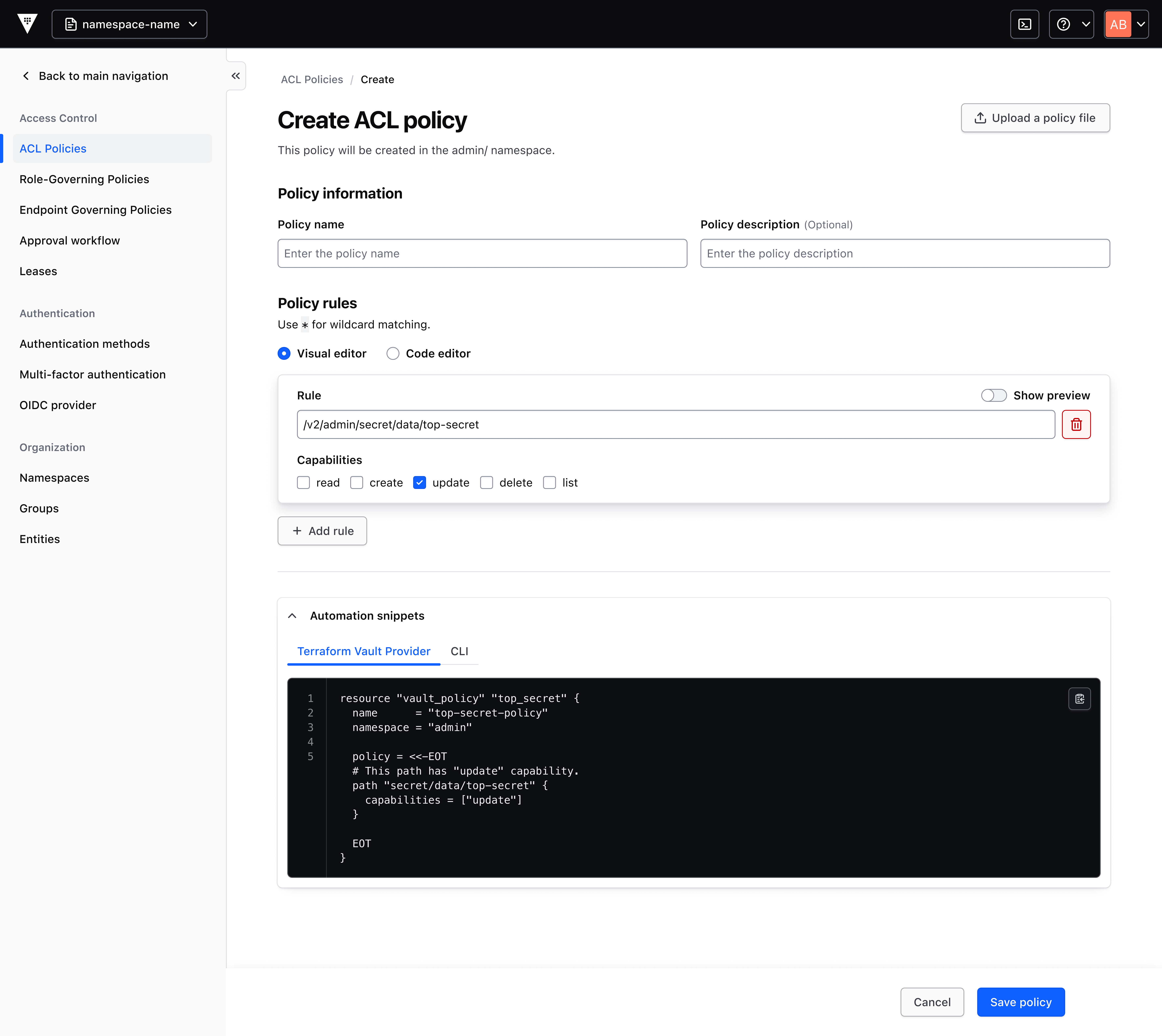
2. Visual Policy Generator
One of the biggest hurdles for new Vault users is writing policies from scratch. In Vault 2.0, the visual policy generator transforms this task into a simple form-filling exercise. Users select resources, actions, and conditions from dropdowns, and the tool generates best-practice policy snippets automatically. These snippets can be copied for use with the Terraform Vault Provider or saved directly to the cluster. This feature eliminates the need to memorize Vault's policy language, reduces errors, and accelerates time-to-value. It's particularly useful for organizations that need to enforce least-privilege access across multiple teams.
3. Onboarding Wizard for Use Cases
Rather than expecting users to know exactly which feature to use for their scenario, Vault 2.0 includes an onboarding wizard that asks simple questions about intended usage—such as storing API keys or managing database credentials. Based on the answers, the wizard generates a fully editable code snippet tailored to that use case. This guided approach not only speeds up implementation but also educates users on Vault's capabilities. The wizard supports both new and experienced users, offering shortcuts for common patterns while remaining flexible enough for advanced customizations.
4. Introductory Pages for Every Feature
Every feature in Vault 2.0 now comes with a dedicated introductory page that explains its value proposition, typical use cases, and a recommended quick-start action. These pages act as embedded documentation, reducing the need to consult external resources. For example, when a user navigates to the secrets engine section, they see a brief overview of each engine type along with a “Get Started” button that pre-populates the necessary configuration. This contextual help ensures that users always have relevant information at their fingertips, fostering self-sufficiency and reducing support tickets.
5. Navigation Bar Organized by User Problems
The revamped navigation bar categorizes features based on the problems they solve rather than technical jargon. Common tasks like “Rotate Secrets,” “Manage Policies,” or “Monitor Usage” are prominently displayed. This human-centric design helps users quickly locate the functionality they need without diving into menus. The new layout also surfaces less-used but powerful features, increasing overall feature adoption. For administrators, this means less time spent training users and more time focusing on strategic goals.
6. Enhanced Consumption Reporting and Visibility
Vault 2.0.1 introduces improved reporting dashboards that provide granular visibility into resource consumption across secrets management, key lifecycle, identity brokering, and data protection. Teams can now see usage patterns, track adoption rates, and forecast capacity needs. These reports support governance initiatives by offering a clear audit trail of who accessed what and when. The enhanced visibility helps organizations optimize their Vault deployment, avoid quota overruns, and plan for future growth. For compliance teams, this feature simplifies reporting for regulatory audits.
7. Contextual Tooltips and Inline Guidance
Throughout the UI, Vault 2.0 places tooltips and inline guidance to explain terms, options, and potential impacts. For example, when configuring a dynamic secret engine, a tooltip might explain the difference between lease duration and max TTL. This reduces the cognitive load on users, allowing them to make informed decisions without leaving the interface. The guidance is concise and non-intrusive, ensuring it helps without overwhelming. Over time, users naturally learn the Vault ecosystem, becoming experts without needing external training materials.
8. Best Practices Implementation Assistance
A major goal of the Vault 2.0 UI is to enable quick adoption of best practices. Features like the visual policy generator and onboarding wizard come pre-configured with recommended settings based on industry standards. For instance, when creating a new policy, the form automatically suggests least-privilege rules and warns if permissions are too broad. This built-in guidance ensures that even novice users follow security best practices from day one. It also helps organizations achieve compliance with frameworks like SOC 2, ISO 27001, and GDPR by default.
9. Deep Integration with Terraform Vault Provider
The policy generator and other UI enhancements are designed to work seamlessly with the Terraform Vault Provider. Users can generate policy snippets and directly export them as Terraform configuration blocks. This integration promotes infrastructure-as-code practices, making it easy to version control, review, and automate policy deployments. For organizations already using Terraform, this reduces friction and ensures consistency between manual UI actions and automated deployments. The result is a unified workflow that bridges the gap between GUI and CLI.
10. Consumption Data for Forecasting and Planning
Beyond basic reporting, Vault 2.0 provides consumption data that helps teams forecast future resource needs. By analyzing trends in secret usage, number of leases, and API calls, administrators can predict when they might need to scale their Vault infrastructure. This proactive visibility supports budget planning and capacity management. Additionally, the data can be exported for integration with third-party analytics tools. For large enterprises, this capability is critical for maintaining service levels and avoiding unexpected costs.
In conclusion, IBM Vault 2.0 redefines the secrets management experience by putting usability at the forefront. The combination of a revamped UI, guided onboarding, visual policy creation, and enhanced reporting removes the traditional barriers to entry. Organizations can now secure their secrets more quickly, with less training and fewer errors. Whether you are a seasoned Vault administrator or a newcomer, these 10 enhancements ensure you get the most value from your secrets management investment. Explore Vault 2.0 today and see how simplified security can accelerate your digital transformation.
Related Articles
- Mastering Chatbot Development with Python's ChatterBot Library: A Comprehensive Guide
- Cloudflare's 'Fail Small' Initiative: Building a More Resilient Network for the Future
- Your AI Era Begins: Jensen Huang's Commencement Wisdom for the Next Generation
- The Cyclical Evolution of Web Development: From Hacks to Standards
- Navigating the Future of Work: Coursera's New Programs Bridge AI, Technical Expertise, and Leadership
- AWS Unveils Next-Generation AI Agents and Amazon Quick Assistant at 2026 Event
- AWS Unveils Next-Generation AI Agents: What’s New at the 2026 'What’s Next' Event
- Kubernetes 1.36 Introduces Adjustable Resource Allocation for Suspended Jobs